I'm starting a long four day weekend today. As of 2:10, the weekend had begun, but I stayed at school about an hour longer to get some paperwork done before heading out. 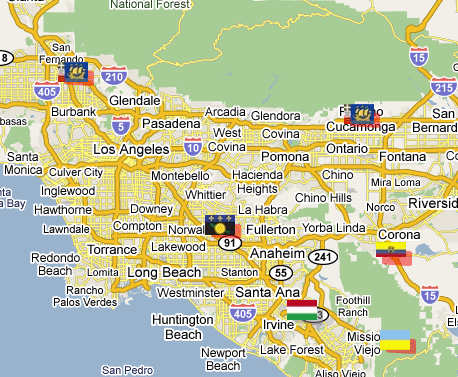 Then I made a side trip to REI to pick up a windshield mount for my Garmin eTrex Legend. Up until this year, California was one of only two states that didn't allow windshield mounts for anything. As of the first of the year, the state now allows windshield mounts for GPS units as long as they are placed in the lower left corner or the lower right corner of the windshield. I plan to use the mount tomorrow morning when I go on a virtual flag run starting near Sylmar and ending somewhere down in the OC.
If you look at the map, you can see a nice line of 4 virtual flags running in a southeasterly direction, or northwesterly direction along Interstate 5. The purpose of this game is to get to within 100 meters (325 feet) of these virtual flags and tell others what you found there. Points are scored for each flag found. I found the Ecuador flag just south of Corona on the map last week and the flag situated in what looks like the middle of Rancho Cucamonga is pretty much inaccessible to get. The red highlight around the flag indicates that it's about to expire within the week and then won't be there anymore. Not like it's there anyway, since it's just a virtual flag. I could still go to the point, but couldn't score any points for the flag after it expires.
We plan on starting at the northwest end and work our way to the southeast on this particular trip. I ran some PQs around each spot where there would be a flag present, so at each spot we'll grab a couple of caches as well. I looked over some of the caches last night and picked a couple out that I want to try and get. That's one of the reasons I got interested in GeoVexilla. The flags are randomly generated, so when flags come up near where I live, I can go out and get those flags, plus possibly cache in a new area where I haven't cached before.
There appears to be an interesting virtual cache at an automobile museum near Sylmar. I wasn't aware there was a museum up in that particular area, so I'm hoping it should be an interesting side trip for us. There are also a couple of Letterbox Hybrid caches down in Orange County that we might be able to get as well. I've been working on a Letterbox Hybrid of my own, but haven't found the right hiding spot for it as yet, so getting one of these might prove helpful. Letterbox hybrids involve using clues, not necessarily geographic coordinates to find the cache.
All of the caching will be weather dependent since we have a high chance of rain tomorrow. It's actually supposed to rain the entire weekend (who ordered this up on a four day weekend no less?), but we'll see what happens. Tomorrow looks the least likely for us to get wet, so that's a good thing. We do have one more stop that's not marked by a flag on the map and that would be lunch. Since we're going to be driving very close to corporate headquarters of In-n-Out Burger, we're planning on stopping there for lunch. There's a micro there which we hope to grab and a couple of blocks north is a cache hidden near one of the old stations to the Pacific Electric Railway, commonly called the Red Car. For those of you not from Southern California, and have never heard of the Red Car, the movie "Who Framed Roger Rabbit" deals with the eventual demise of the Red Car in a very humorous way. Whether that's actually what happened or not is beside the point. It's a very enjoyable and well done movie and had some good groundbreaking new types of animation in it, pre-Pixar.
I don't see too many obstacles to our run tomorrow. It should be an enjoyable day. I'll write more about it later in the weekend, particularly if I happened to be rained in for the rest of the weekend. I'll not complain though, since the entire state needs a few more good soakings this year and perhaps every year to keep the reservoirs filled. Drought is not a pretty thing in the state of California.
Thursday, February 12, 2009
The Interstate 5 run



Thursday, October 9, 2008
Surprising Results
Going to be heading down to Orange County to grab this particular Dash Point. We got lucky when the computer program for this month set that one up. It's in Ronald W. Caspers Wilderness Park very near a fire road trail, so it should be easily reached after about a two mile hike or so. I ran a PQ centered around that point and got the strangest looking PQ map I've seen in awhile. This is a pretty rural area but I was still expecting to see more caches along the Ortega Hwy. The arc to the west is in urban Orange County, but the nothingness to the east of the center of the PQ was surprising until I thought about it. The area to the east is pretty rugged and mountainous. I think I was surprised that there weren't more caches hidden along the Hwy. I guess we'll find out when we get there on Saturday. It could be that it's not safe to stop along most of the road. If you're not from this area, the grey area to the south is Camp Pendelton Marine Corp Base.
The Dash Point is in the center of the map and we'll be going for the caches located there. Most of them are along the trail and so they're not micros, but good sized caches. When the Tadpole found out about that, his immediate reaction was, "Score!" I have to agree with him. I'll be sure to take the camera along to get some pictures.
Another surprise was I couldn't find a public route query for the highway either, so I had to create my own. That wasn't too much of a problem. Just opened up Google Earth and asked for directions between San Juan Capistrano and Lake Elsinore. That gave me a route that I saved to my computer which I then uploaded to Geocaching.com. I put in some parameters for the route and came up with 69 caches along the route, most of which are centered around San Juan Capistrano and up around Lake Elsinore. There really aren't that many caches along that route. I've made the route public. You can search for it using keywords, Ortega, Elsinore or Capistrano.

Friday, July 25, 2008
Turbocharging Cachemate
I got myself a Palm Tungsten T5 a while back to use for paperless caching. Now, before I scare away those of you with limited budgets, I'll confess that it's much more than I really need for the task -- in fact, my old Palm IIIxe, which I sold to another cacher for about $20, would have been more than adequate for the task. But the color screen is a lot easier for me to read (most of the time -- glare can be a problem on sunny days), and the additional memory along with the support for an SD memory card were big plusses for me.
You see, there are some days when I set out specifically to go caching. So creating a pocket query, getting the data into Cachemate, and hitting the road aren't big problems. BUT . . . . there are even more days -- say, about 90% of all days -- when I'm simply out and about in the Chicago metro area and find myself with some time on my hands and wishing I could find a cache or two nearby. But if I didn't know ahead of time I was going to be in that area, and that I'd have time for caching, then no PQ, no Cachemate data, and no waypoints in my GPSr.
So, I've set up a series of pocket queries that run weekly to collect all of the caches in areas of interest to me -- Northern Illinois (roughly, everything north of I-80), parts of Wisconsin (where I camp, and where my daughter goes to college, and the routes along the way), parts of New Jersey (where my in-laws live <insert your own New Jersey and/or in-laws joke here.>). Right now, in GSAK I have 5365 Illinois caches, 1366 Wisconsin caches, 998 New Jersey caches, and 127 caches in a database I call "events" -- not geocaching events per se, but any special occasion for which I want to load up caches in particular areas.
Uh-oh.
Turns out it's easier said than done. When I hotsync my PDA and start to load up the data into Cachemate -- especially the large Illinois and Wisconsin data loads -- I can watch everything progress nicely for the first couple hundred caches. But then it gets slower . . . . and slower . . . . . . . and slower . . . . . . . . . . . . . and slower . . . . well, you get the picture. And, sometimes, the load fails before it's processed all the caches.
There has to be a better and faster way. Fortunately, there is! Cachemate supports memory cards on the Palm PDAs, and in the documentation it describes how to take advantage of it. But before going into the technical details of how to do it, let me give you a quick description of why it works.
When you create your Cachemate file for the PDA and hotsync it, what happens is that Cachemate loads (or tries to load) all of the cache data into its database. If you have thousands of caches, many of which may have lengthy descriptions and/or lots of logs, that takes up a lot of space and time. When you use memory card support, though, Cachemate handles the load a bit differently. Instead of copying all of the cache data to its database, it instead loads just the cache ID and a few bits of other data, along with a pointer to the rest of the data which remains on the memory card instead of being transferred into the database. In addition, since you're going to take the hotsync process out of the procedure, you can save even more time getting the data to the PDA. So, let's move on to the geek stuff.
Step 1: Clear databases on Cachemate (optional, but recommended) For me, GSAK is my database of record. While Cachemate can merge information, I always completely replace the data with new data from GSAK. On your PDA, launch Cachemate, then from the menu, select each of your databases you are about to load, and use the CLR button to clear them out.

Step 2: Connect your PDA to your computer as a USB drive. Plug your Hotsync cable into your PDA and a USB port on your computer. (USB 2.0 is recommended, if available -- it's a lot faster.) Go to the main application screen on your PDA; there will be an application called Drive Mode. Tap on that application, then tap on the Turn Drive Mode On button.

Step 3: Create folder for Cachemate files (first time only) Your PDA will now show up in Windows Explorer as a disk drive -- or two, if you have an SD card installed. (**See important note at the end of this article.) On this new disk drive, you have to create one of the four folders that Cachemate looks for, as described in the documentation. To keep it simple, I created the \Cachemate folder. You only have to do this the first time.

Step 4: Create Cachemate files. I use GSAK, so that's what I'm using in this example. But whatever tool you use to create your Cachemate files, the process should be similar. In GSAK, you simply specify the drive letter and path for the file you're creating, pointing it to the folder you just created. Also, uncheck the box that says Install to Palm after conversion -- you don't want to do this, because there is no need for Hotsync to process the file. After you've created your files, they'll show up as .pdb files in the folder you created.

Step 5: Disconnect the PDA from the computer. And make sure you do it properly, so you don't lose any data. Down in the system area of your Windows taskbar is an icon that will allow you to "safely" disconnect your USB drive. You need to do this so that Windows will flush out its write buffers to your PDA. After Windows tells you it's safe to remove the device, then click the Turn Drive Mode Off button on your PDA.

Step 6: Launch Cachemate and load data. Launch Cachemate on your PDA. A screen will pop up telling you that new files have been found on your memory card. Click OK, and then a file import dialog will appear, once for each file you created. For each file, select the Cachemate DB you want that file imported into. If you didn't clear the DB first, then Cachemate will merge the data according to whatever identifier you selected for cachemate -- name or waypoint code.

Step 7: GO CACHING!!
How fast is it? Well, for the 5000+ Illinois caches I load, the import used to take 10-15 minutes -- if it worked at all. It often failed to complete successfully. With this new procedure, the import process on Cachemate finishes in about 30 seconds, and it always works. Do I need any more reasons to use the memory card support?
Update@21:05 -- let me clarify that this does not depend on having a separate memory card. If you can put the device in Drive Mode, then you can write to either the internal memory or the removable SD card. So if you have an older PDA that doesn't support an SD card, this may still work for you. And if your PDA does not come with a Drive Mode application, there may be a freeware version available you can download and install.
(**OK, here's the important note I promised you earlier. If you have an SD card in your PDA as well as its internal memory, it will show up as TWO separate drives when you turn on Drive Mode. And here's the kicker -- it always wants to use the lowest available drive letter plus the next consecutive drive letter. If that next consecutive drive letter is in use, it won't map the SD card. So if you have the most basic configuration with your hard drive as C: and a CD or DVD as D:, when you enter Drive Mode on your PDA, it will use drive letter E: for the internal memory, and F: for the SD card. But let's say you already have a flash drive attached as F: -- then, Drive Mode will map the internal memory as E:, but won't map the SD card at all. I tore out more than a little bit of hair before I found someone's blog post documenting this.)

Tuesday, May 13, 2008
Caching Across the Border
This summer, I expect to garner another first in my geocaching career. First cache in 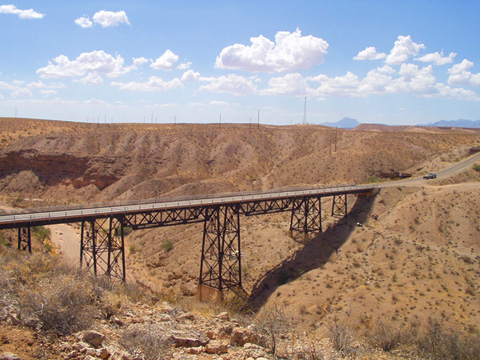 I think it’s a little bit harder out west because our states are so big. I would be willing to bet that most cachers who live back east and cache on the average of once a week probably have cached in several states within their first year.
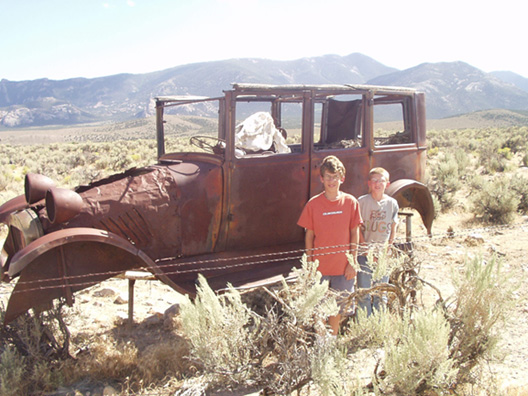 I had the printout and that was it. I guess you could say we were lucky, since I believe that was the only printout I made for that particular camping trip. But number 8 became our second state.
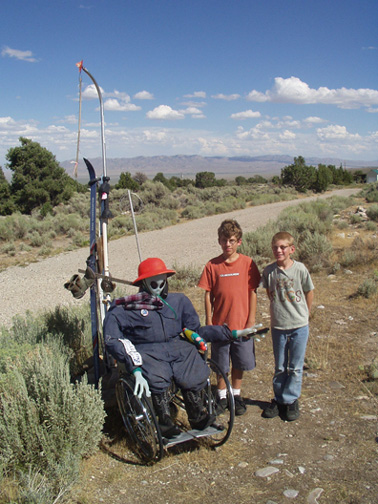 Once we moved into
 We’re going to be camping in
Pictures were taken at or near the following geocaches:
Bridge View - by V=Brats
Who waxed Mr. Ed? - by fooshfoosh and family

Tuesday, March 4, 2008
Trip of a Lifetime
One of my students has a fairly well off step-grandmother. A couple of years ago, she decided that her grandchildren needed to get the travel bug and told them for their 13th birthday, they could go on a “trip of a lifetime,” anywhere in the world they wanted to go. My student, being the oldest of this woman’s four grandchildren just passed his thirteenth birthday last summer and this week will be hopping on a plane down to South America to tour the Galapagos Islands.
When I heard about this trip, my first thought was wondering how I could get adopted by this kid’s mother – she happens to be one of my co-workers – so I could get a trip like this as well. I guess you could say I was as green as Kermit the Frog with envy, but I got over it and decided to 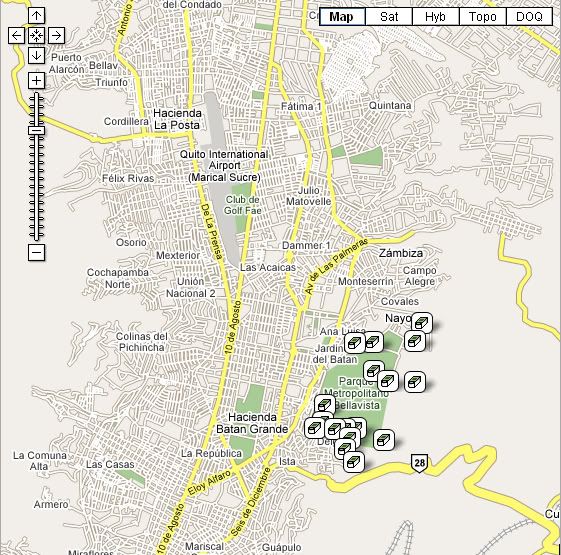 live vicariously through my student’s talk about the preparations of the trip. My only request was that he send me a postcard from South America. We’ll see whether that happens as I’ve had a chance to look at his itinerary, which he gave me yesterday and he’s going to be a very busy boy over those 10 days.
The itinerary intrigued me, however, because I noticed that he’s going to be in Quito, Ecuador for a good couple of days before he heads to the Galapagos. Knowing that he is a geocacher, I semi-facetiously asked him whether he was planning on getting any caches while down there. His initial response was, “Oh, there can’t possibly be any geocaches down in Ecuador.”
With the gauntlet thrown, I took up the challenge and did a quick search by country on geocaching.com and came up with 24 caches in Ecuador. I then quickly mapped it and put it into the Geocaching Google Map so he could see where the caches were. Most of them are concentrated in Quito, 17 in a very large metropolitan park in downtown Quito with a virtual about 8 miles north very near the equator. Once I showed him that most were regular sized caches, he was very interested. In fact, I think the words that came out of his mouth were something on the order of, “Oh, I so have to do this.” He says his grandmother will really love this, so in the process, we may hook another geocacher as well.
I quickly sent his mother an email stating, I had to look and see if there were any geocaches down in Ecuador. Her response back was, “I’ll have to send the GPSr with him when he goes.” The ball was starting to roll. They’re fairly new geocachers and aren’t premium members so they weren’t really familiar with Pocket Queries (PQ), so I volunteered to make a PQ for the local caches down there and upload them into their GPSr 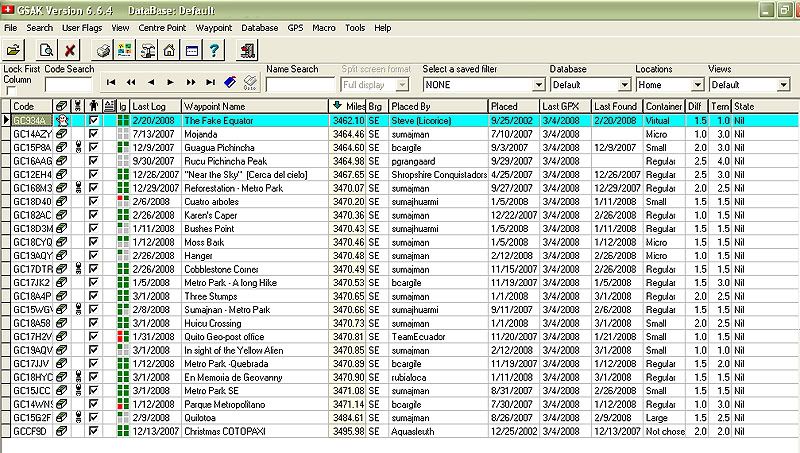 for him as he didn’t feel comfortable hand inputting all the coordinates. It was kind of funny to look at my GSAK filter of the caches and see that the closest cache was 3462 miles away from home.
When I asked him at first, I really wasn’t expecting an enthusiastic response, figuring his time would be booked, but he said he had some open ended time the first couple of days, so this would really be cool to do. Both he and I agreed that these once in a lifetime trips do really come only once in a lifetime, so you need to make the most of them. Besides, he’ll be able to come back and state that he found a geocache near the equator. Not many people around here can boast about that.
One of these days, hopefully, I’ll get down to the Galapagos. It is on my list of things to see before I die. Whether geocaching is still around then, who knows? But at least for now, I'll be able to cache vicariously through my student when I read his logs on the caches that he found.